
mech.vin · the mechanic app in MECH Orbit

Work you can see.

The mechanic takes a photo, says a sentence and taps “done” — from the phone, without leaving the car. Photo, voice and status land straight in the CRMmech work order. You see every bay without a single call. The mechanic sees what they’ve earned.
Android · Google PlaySign-in — for your shop’s mechanicsWorks together with CRMmech
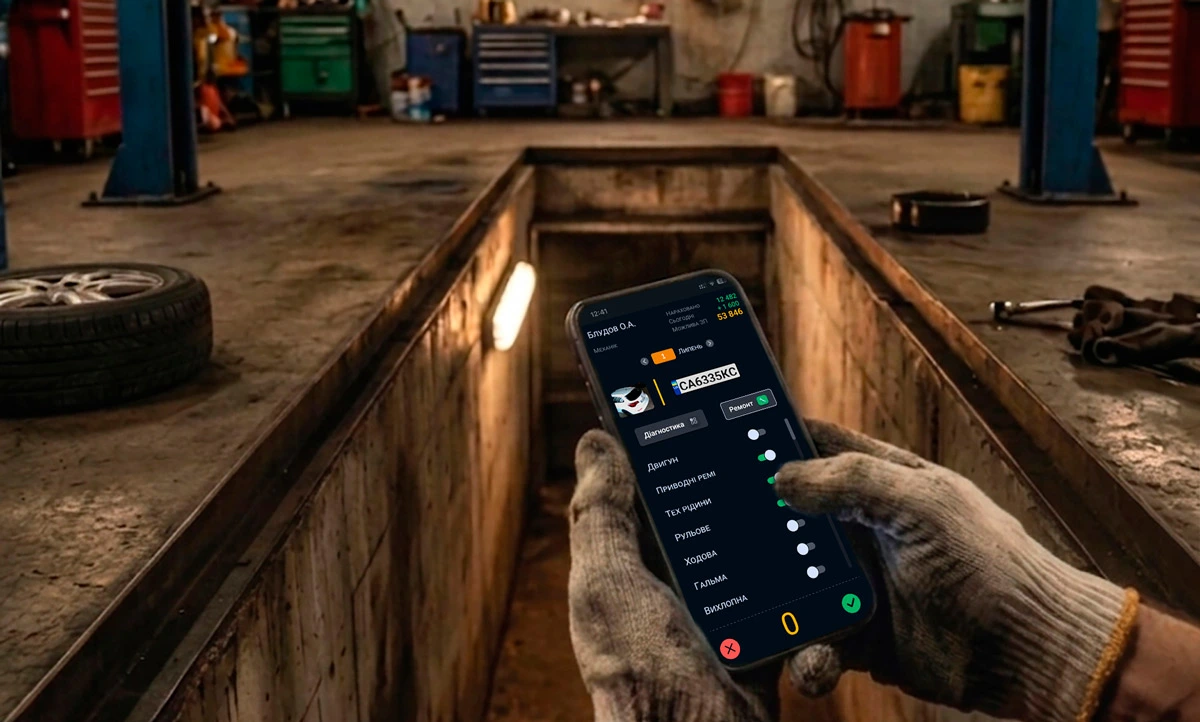
Mechanic in work gloves holding a phone with mech.vin over an inspection pitBay 2 · in progress
mech.vin · mechanic · 13:10Defect photo: front suspension
CRMmech · you · 13:10Added to work order CA8876CO
01 · How it works

“My mechanics won’t learn new software.” They don’t have to.

mech.vin isn’t software — it’s a tool at the bay. The mechanic doesn’t fill in forms or spreadsheets: they take a photo, speak and tap. The complicated part stays with the system, not with people.

01Photo

Found a defect — took a photo.

The photo goes into this car’s work order, not the mechanic’s camera roll.

02Voice

Said one sentence.

No keyboard, no dirty hands on the screen. The information reaches the service advisor without being retold.

03Status

Tapped “done”.

The car’s stage changes in CRMmech. Nobody calls the bay to ask how it’s going.

Diagnostics — tick boxes on one checklist
  1. Engine
  2. Drive belts
  3. Fluids
  4. Steering
  5. Suspension
  6. Brakes
  7. Exhaust
02 · What you see

The mechanic is at the bay. You are anywhere.

Every action in mech.vin instantly continues the process in CRMmech. Yellow is what the mechanic does. Blue is what you see.
Bay · mech.vin · mechanicOffice · CRMmech · you
Photographs a defectThe photo is attached to the work order. Not “something’s knocking in there”, but a picture.
Goes through the diagnostic checklistYou see which components were checked. Every mechanic follows one list, not their memory.
Changes the job statusThe stage of every car — without calling the bay and without being at the shop.
Sees parts status for their carThe mechanic doesn’t go asking whether the part has arrived. You see which car is waiting for it.
Closes the jobMechanic pay is calculated from closed jobs, not from the foreman’s memory.
03 · One repair, start to finish

From arrival to approval. Without a single call to the bay.

  1. 12:45Vision AI · cameraThe car entered bay 2. Plate recognised, work order opened.For a new car, the service advisor checks and completes the details. Without cameras the advisor opens the order — everything else works the same.
  2. 12:52mech.vin · mechanicThe mechanic received the task on the phone.
  3. 13:05mech.vin · mechanicChecklist diagnostics: engine, belts, fluids, steering, suspension — ticked off.
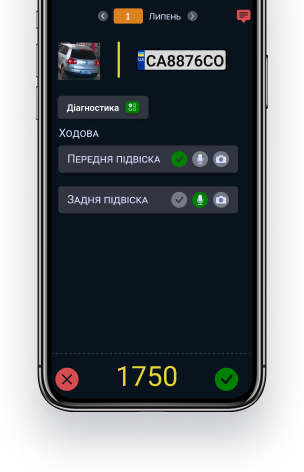
  4. 13:10mech.vin → CRMmechFront suspension defect photographed and added to the work order.
  5. 13:30CRMmech · service advisorThe advisor picked parts: OEM, alternatives, supplier prices and stock.
  6. 14:02Customer · smartphoneThe customer approved the estimate items. Date, time and what was approved are saved.The customer doesn’t see the defect photo yet — it stays in CRMmech for the shop team.
  7. nowYou · phone or computerWhich car, at which stage, what’s in the order — no calls and no need to be at the shop.
mech.vin: suspension diagnostics for car CA8876CO, front and rear suspension with photo and voice, 1750 earned
mech.vin · suspension diagnosticsreal screen
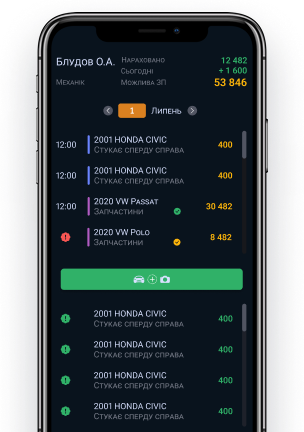
mech.vin: mechanic’s jobs for the day by car, earned, today and potential pay
mech.vin · jobs and earningsreal screen
04 · What the mechanic gets

Their work is visible too. And it’s counted.

Earnings for the day, week and month — in the same app where the mechanic closes jobs. They have a reason to open mech.vin, not just you.

Pay speedometer
“Earned”, “Today”, “Potential pay” — right on the first screen.
Fewer disputes
Less “did you really do that?”: the work is recorded with a photo and a status.
Less running around
Tasks, cars and parts status — on the phone, not on a scrap of paper.
How we know

“We don’t sell theory. We run this ourselves.”

AutoAtmosphere · service network · Kharkiv and Cherkasy · 3 years in live operation

Three years at AutoAtmosphere
05 · Getting started

mech.vin isn’t sold separately.

It’s part of MECH Orbit. The app is on Google Play, but only a mechanic your shop has added in CRMmech can sign in.

Book a demo 14 days free · no card
  1. 01Connect CRMmech14 days free, no card required. Cameras are optional.
  2. 02Add your mechanics in CRMmech
  3. 03The mechanic installs mech.vin from Google PlayAnd signs in with the account you created.
  4. 04Start with one or two mechanicsBring in the rest once the habit forms.
06 · Questions

What shop owners ask. Honestly.

Won’t mechanics refuse to learn a new app?

They don’t have to work with spreadsheets or forms: phone, photo, voice, status. 1–2 days of training and a week to build the habit. Start with one or two mechanics.

How long does switching the whole shop take?

Longer than it takes a mechanic to get used to it. Setting up the shop and cameras takes about two days. Team adaptation takes up to two months. Anyone promising everyone will adapt in a week has never rolled it out.

Does it work without cameras?

Yes. Without cameras the service advisor opens the work order, and the mechanic works in mech.vin the same way. Cameras and Vision AI can be added later.

Does the customer see the defect photos?

Not yet. The customer sees the estimate and approves its items from a smartphone. The mechanic’s photos and voice notes are stored in CRMmech for the shop team.

If a mechanic leaves — what happens to the data?

The account is disabled; the job history stays in CRMmech.

Where do I download mech.vin?

On Google Play. Only a mechanic the shop has added in CRMmech can sign in.